Plan Your Attendance.
Bunk Smarter.
Upload your timetable or import your section's batch code. Sync your portal baseline, log duplicate slots independently, and use 4 powerful calculators to map out safe leaves—while staying safely above 75%.
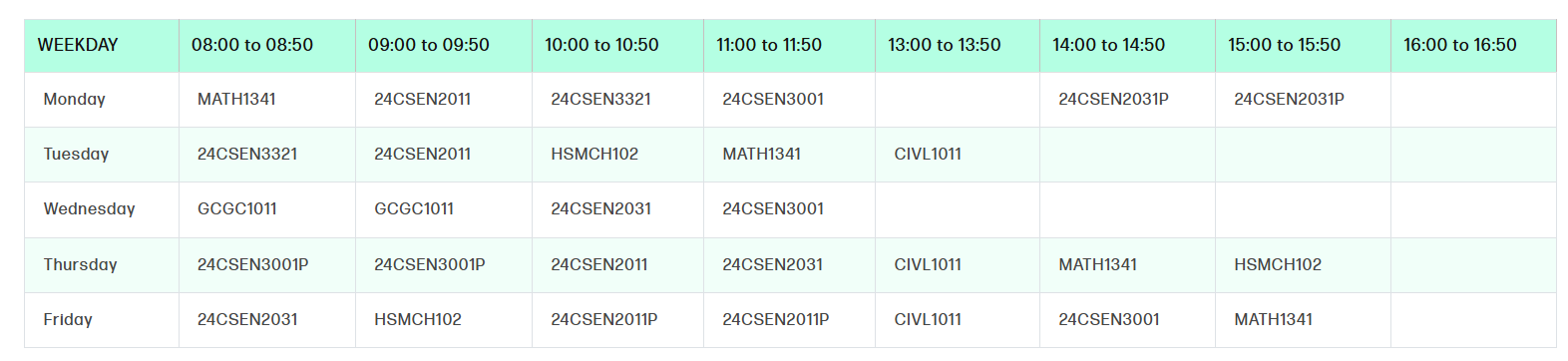
| WEEKDAY | 08:00–08:50 | 09:00–09:50 | 10:00–10:50 | 11:00–11:50 | 13:00–13:50 | 14:00–14:50 | 15:00–15:50 | 16:00–16:50 |
|---|---|---|---|---|---|---|---|---|
| Monday | CS2031 | MATH201 | PHY301 | CS2031 | — | CS2041 | MATH201 | — |
| Tuesday | CS2011 | MATH201 | HSMCH102 | PHY301 | CS2031 | — | — | — |
| Wednesday | GCGC1011 | PHY301 | CS2051 | CS2031 | — | — | — | — |
| Thursday | CS2011 | MATH201 | PHY301 | — | CS2031 | CIVL1011 | CS2041 | HSMCH102 |
| Friday | CS2011 | HSMCH102 | PHY301 | MATH201 | — | CIVL1011 | CS2041 | CS2031 |
Everything you need to plan smarter
Skip the tedious daily tracking. Just sync your baseline attendance percent and compute.
Installable PWA Support
Install Attendify directly on your Android, iOS (Safari -> Add to Home Screen), or Desktop. Launch it full screen with full offline caching capability.
Timetable Batch Sharing
Set up your timetable once, generate a custom batch code (e.g. BATCH-A4K8), and share it with classmates so they copy the schedule instantly.
Attendance Data Auto-Sync
Simply copy and paste your attendance grid from the college portal. Our parser auto-corrects subject codes, syncs baseline statistics, and is offset-aware.
Projection Calculator
Enter your current % and future date range. Calculates scheduled classes and projects your future percentages, accounting for planned absences.
Skip Planner (75% Threshold)
Know exactly how many classes you can safely bunk in any upcoming period while keeping your attendance above the required 75% examination threshold.
Daily Logger & Exclusions
Log individual duplicate slots (periods) independently directly on your dashboard. Single-day holidays or breaks are automatically filtered out.
Why Attendify is different
Zero-friction attendance calculations built around your portal
Frequently Asked Questions
Stop guessing. Start planning.
Join classmates who plan their bunking schedules mathematically. Spend less time logging classes and more time planning safely.
Create Free Account